Simulation best practices
Last updated: October 28, 2026
A good simulation tests one skill in one situation, with a persona who acts like a real person. In the new create flow, most of what you used to write as one long prompt now has its own field. Use the fields, keep the text short, and preview before you assign.
Pick the type that matches the skill
The type decides how the AI acts and how the attempt is scored, and you cannot change it once the simulation is created. See Interaction types and which one to choose before you start.
Build one simulation around one situation
Each simulation covers one situation, with one result you can call success. "Book a second meeting with a sceptical Head of Talent Acquisition" is a situation. "Sales calls" is a topic, and topics give shapeless conversations that are hard to score fairly.
If a simulation has two prospects or two problems, make two simulations. The AI tends to follow one thread and drop the other.
Build for difficult calls as well as easy ones. A library where every prospect says yes to the first offer does not prepare reps for real calls.
Put the person on the persona and the call on the simulation
The persona is who the learner talks to, and it is the same in every simulation that uses it. The simulation is one call with that person: the situation, their goal that day, the difficulty, and the facts that are only true on this call.
If you put one call's details on the persona, they turn up in every other simulation that uses it. Persona settings has the full split.
Use the field, not a sentence in the instructions
Many things you used to write in the prompt now have their own field. The AI reads a field more reliably than a sentence buried in a long text.
You want the AI to… | Use this field | Where |
|---|---|---|
know a detail, and decide when to share it | Facts, with how the AI uses each one | What the AI knows |
refuse to talk about something | A fact set to Won't say, or AI won't answer on an Expert Q&A | What the AI knows |
sound short, doubtful, annoyed or vague | Levels on the persona | The persona editor |
be harder or easier to win over | Difficulty | Details, at the top of the editor |
give up sooner or later | Patience | How it runs |
react to something the learner does | How the AI reacts | How the AI behaves |
move through the call in order | Stages, called Phases on Coaching and Steps on Walkthrough | How the AI behaves |
use product or policy material | Reference material | What the AI knows |
tell the learner what to do | Learner instructions | What the learner does |
score the call | Scorecard, and which of its sections count | What success looks like |
Keep Instructions for the AI for the situation: who the persona is talking to, why, and what they want. A few short paragraphs is enough, written to the persona as "you". Do not put the learner's task there, because the persona can repeat it back to them. See What the AI knows and what the learner is told.
An example
Weak instructions:
You are an angry prospect. Be difficult. Don't tell them your budget unless they ask. If they mention LinkedIn, push back. The rep should lose points if they don't agree next steps.
The same simulation with the fields:
Instructions for the AI: "You are calling because Claire needs to fill a steady stream of warehouse and driver roles (about 150 a year). She already uses LinkedIn Recruiter and is sceptical of sales calls."
Facts: "Approximate annual hiring budget for job ads: About £40,000 a year", set to When asked.
How the AI reacts: "When the learner handles the 'we already use LinkedIn' objection with a vague rebuttal, the AI persona will ask for evidence or case examples."
Difficulty: Medium, with the persona's Scepticism Level on High.
Scorecard: "Sales discovery call", including the section "Next steps agreed".
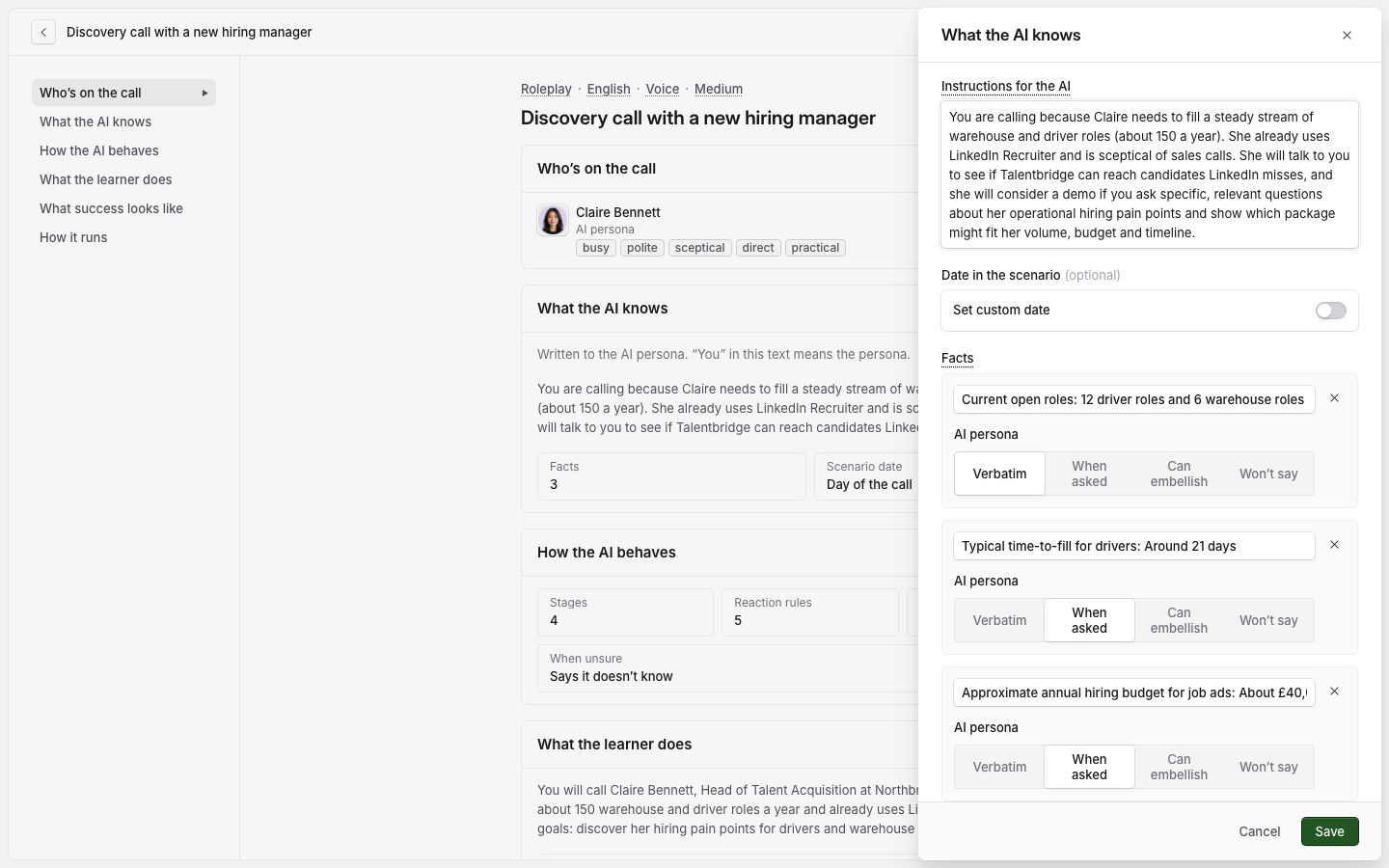
Give the AI facts, not adjectives
"Difficult" and "sceptical" leave the AI guessing. Concrete facts and reactions give it something to act on, so the persona behaves the same way on every attempt.
Instead of "she is busy", add the fact "Has 15 minutes for this call" and set Terseness High. Instead of "he is tough on price", add "Pays £550 a day to his current agency" and a reaction: "When the learner quotes a day rate above £550, the AI persona will ask why it is worth more."
Give the persona a goal and an obstacle
A persona with no obstacle agrees to everything. A persona who can never be won over only trains frustration. Give both. For Marcus Reid, VP Engineering at Fernway Pay:
Goal: "Three contract Java developers in six weeks."
Obstacle: "Will not pay more than his current day rate unless the learner shows faster placement."
What winning looks like, written as a reaction: "When the learner holds the rate band, offers at most 10% off and shows vetting evidence, the AI persona will agree to procurement review and ask for a written quote."
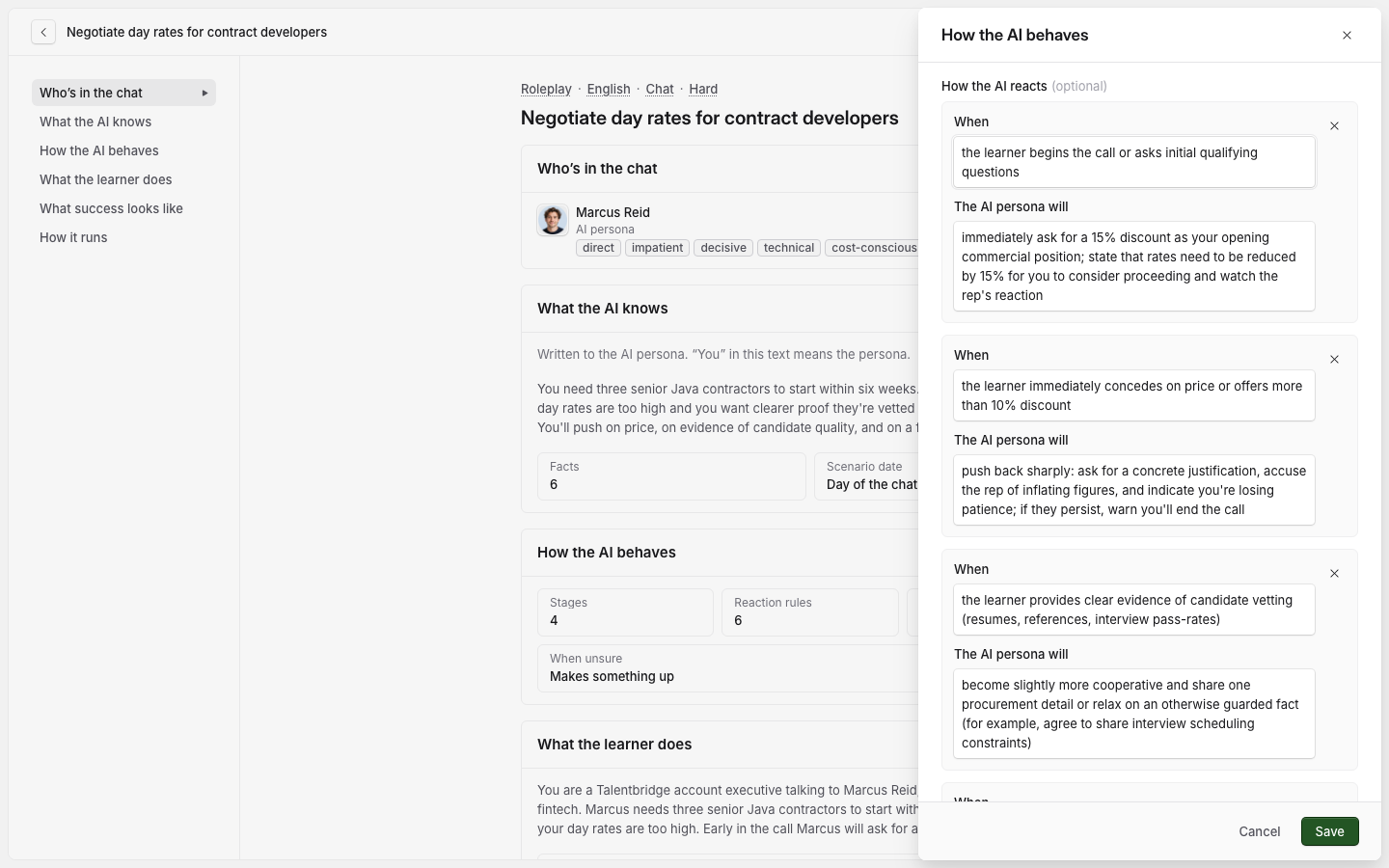
What the AI cannot do
Scoring comes only from the scorecard. A line such as "the rep loses points if…" in the instructions has no effect.
The persona does not coach the learner in the middle of a roleplay. Feedback comes after the call, unless you turn on feedback during the call in What success looks like, or use a Coaching simulation instead.
Only the one persona in Who's on the call takes part. A second character written into the instructions does not join.
The AI cannot time the learner or count their words. Asked to, it invents numbers.
The simulation runs in the persona's language. To change it, change the persona or choose a different one.
Keep it short enough to finish
Aim for a call a learner can finish in a few focused minutes. A simulation that cannot be finished in that time is usually two simulations.
Long text has a cost of its own. Everything the AI is told for one simulation has to fit inside a limit, and a persona save can be refused when a simulation goes over it. Write facts rather than paragraphs, and do not repeat the same instruction on both the persona and the simulation.
Preview before you assign
Run the simulation yourself, as a learner would, and check two things: the conversation goes where you intended, and the score reflects the skill you wanted to measure.
If you can score well without doing the thing the simulation teaches, the simulation is too loose. Tighten the facts, the reactions or the scorecard. See How to preview a simulation.
Deliver it through an assignment
An attempt started from the Simulations library is saved as practice. It does not count towards an assignment, so it will not match your reporting. Send learners to an assignment instead, especially during a pilot. See How to create an assignment.
For simulations that matter, consider a minimum of two attempts. Learners who know a second attempt is coming are more likely to read the feedback from the first.
Related articles
Interaction types and which one to choose
Persona settings
If you have any further questions, contact the Solidroad team via the Help tab in the platform.