What happens when you remove a user
Last updated: September 16, 2026
Removing someone takes their access away, it does not erase what they did. This covers what stops, what stays behind, and what removal does not touch when your workspace signs in through an identity provider. The steps for removing a user are in How to manage users.
What removal changes
Removing a user takes them out of your Solidroad workspace. They can no longer sign in, they stop appearing in Settings > Users, and anything still outstanding for them is no longer theirs to complete.
What stays
Their training history stays in the workspace. Completed simulations, the scores on them, and attempts against assignments are all kept.
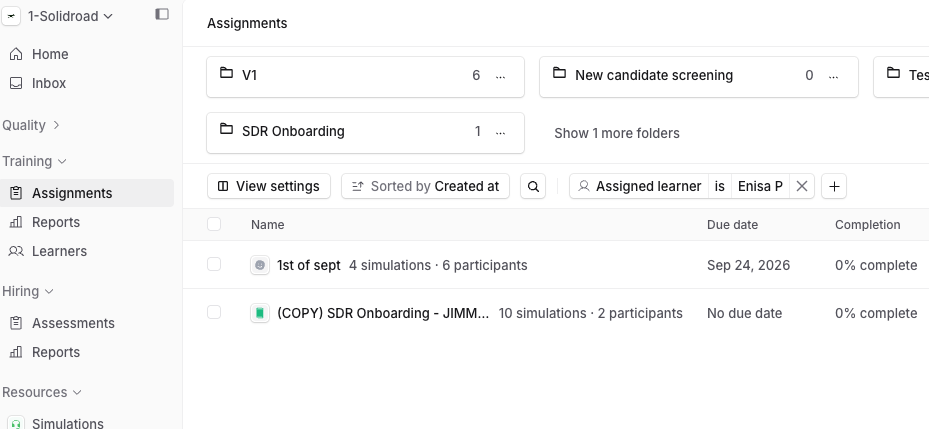
Where you look for it changes, a removed user no longer appears in Training > Learners, so you can no longer open their learner profile. Their work is still on the assignments they took part in: open the assignment and their attempts and scores are there, and you can pick them from the Assigned user filter to see their results on their own.
If your workspace uses SSO
Removing a user from Solidroad does not delete their authentication record with your identity provider. The two are separate, so someone who has left the company should be removed in your identity provider as well, not only here. Doing it the other way round, removing or deactivating them in your identity provider, disables their Solidroad account and ends any sessions they have open.
Provisioning roles, groups and workspace access with SSO and SCIM covers how provisioning works when the two are connected.
If you remove someone by mistake
Invite them back with the same email address. Their previous training history reattaches to that account, so you do not need to rebuild anything by hand.
Related articles
If you have any further questions, contact the Solidroad team via the Help tab in the platform.