How to update a user's email address
Last updated: October 8, 2026
An email address cannot be edited once it is on an account, so changing someone's address means issuing them a new invitation. What you do depends on whether they have accepted the original one.
If they have not accepted yet
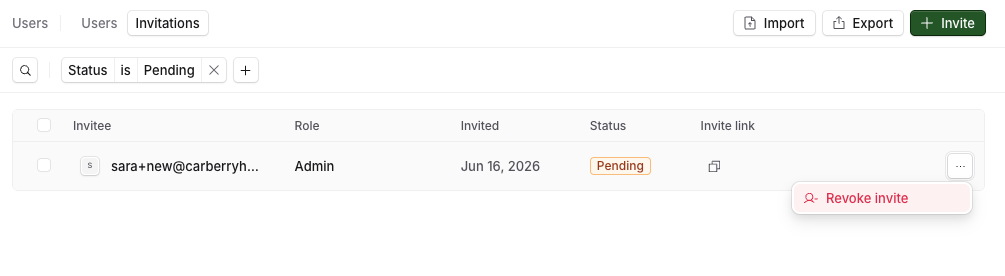
Go to Settings > Users and open the Invitations tab.
Find the invitation with the wrong address and revoke it
Invite them again with the correct address.
Nothing has been set up against the old invitation, so there is nothing else to move across.
If they have already accepted
Remove the existing user. How to manage users covers the steps.
Invite them with the correct address. They arrive as a new user.
Add them to their groups.
Assign their training again.
Steps 3 and 4 matter: the new account is a separate account, so group membership and assignments are set up fresh. Work through them in the same visit rather than leaving the person signed in with nothing to do.
Where their earlier results are
Training history belongs to the account that completed the simulations, so the new account starts without any. Their completed simulations and scores stay in the workspace against the account they used at the time, and you can still find them on the assignments they took part in. What happens when you remove a user covers where to look.
Related articles
If you have any further questions, contact the Solidroad team via the Help tab in the platform.