A system simulation is not working
Last updated: November 5, 2026
Most problems with a system simulation come from the build not having finished, or from the system simulation being locked. This covers those, and the messages you might see along the way.
Edit is greyed out
The build has not finished, or the system simulation is locked.
Check the status first, because Edit only becomes available when it reads Complete. If it does read Complete, look for a Locked badge and a lock icon next to the name, and unlock it from the ... menu on the System simulations page.
The build has sat on Preparing your simulation for a long time
Solidroad reviews the analysis before the copy is built, and the build waits until that review is done, so a long spell on this stage is normal rather than a sign that something has gone wrong.
Contact the Solidroad team to check.
A file will not upload
Check the format and the size. Recordings have to be mp4 or mov, up to 500 MB each. Documents have to be pdf, docx, md or txt, up to 25 MB each.
A file that is still uploading says That file has not finished uploading yet, and cannot be opened or removed until it finishes.
Once you have selected Submit you cannot add files at all.
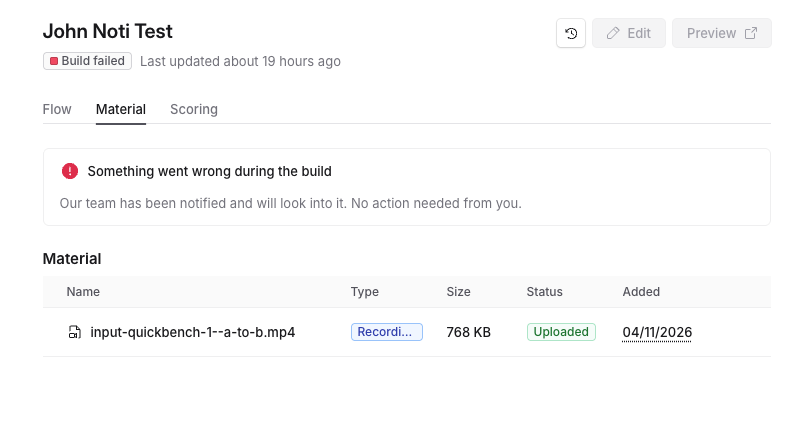
The status says Build failed
The card reads Something went wrong during the build, and Solidroad is told automatically: Our team has been notified and will look into it. No action needed from you.
There is nothing to retry from your side. Contact the Solidroad if you want to check the status of the fix.
The editor will not open
The setup screen stops with an error. Select Retry. A first opening can take several minutes, so give it time before you decide it has failed. If it fails again, contact the Solidroad team.
A learner says the tool will not load
The link to the tool lasts an hour. A learner who leaves an attempt open for longer sees Authorization expired, please start again, and has to start the simulation again.
You see a paused message
System Simulations are paused for this workspace. Contact Solidroad. and Editing is paused for this workspace. Contact Solidroad. both mean Solidroad has paused building or editing for your workspace. Contact the Solidroad team. Anything already published carries on working for learners.
If that doesn't work
When you contact the Solidroad team, include the name of the system simulation, a screenshot of what you see, and roughly when it happened.
Related articles
If you have any further questions, contact the Solidroad team via the Help tab in the platform.