A learner can't see their assignment
Last updated: September 15, 2026
If a learner says they can't find an assignment you know exists, the cause is usually one of a handful of things, most of which take a minute to check from the admin side. Work through these checks in order to locate the most frequent solution.
Check the workspace first
If the learner belongs to more than one Solidroad workspace, confirm they're looking at the right one. A learner can hold a different role, or have no assignment at all, in a workspace that isn't the one you're checking against.
Confirm an assignment actually exists for them
Before troubleshooting further, check as the admin or group lead whether an assignment was ever created for this learner or their group. If none exists, there's nothing to see, and the fix is simply to create or assign one.
Check whether the assignment is still in Draft or Scheduled status
This is one of the most common causes, and the easiest to miss, because nothing on the learner's side indicates why the assignment isn't showing. An assignment left in Draft or Scheduled status is invisible to the learner with no error or message anywhere, even though it may look fully set up to the admin.
The easiest way to check if the assignment is a Draft, is by filtering by Status is Draft
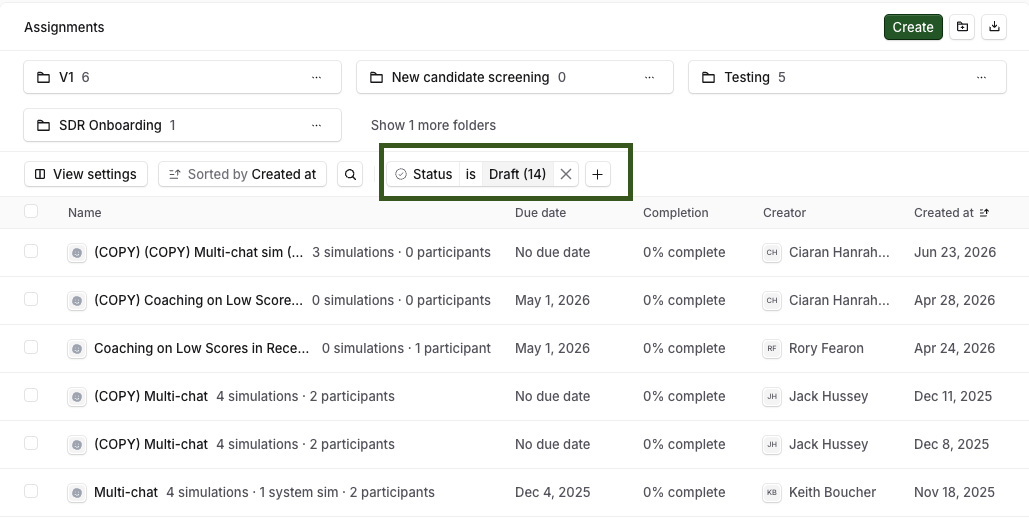
If it's still in Draft, Edit the assignment and then click on "Publish and set live"
To check if the assignment is scheduled, change the filter Status is Scheduled
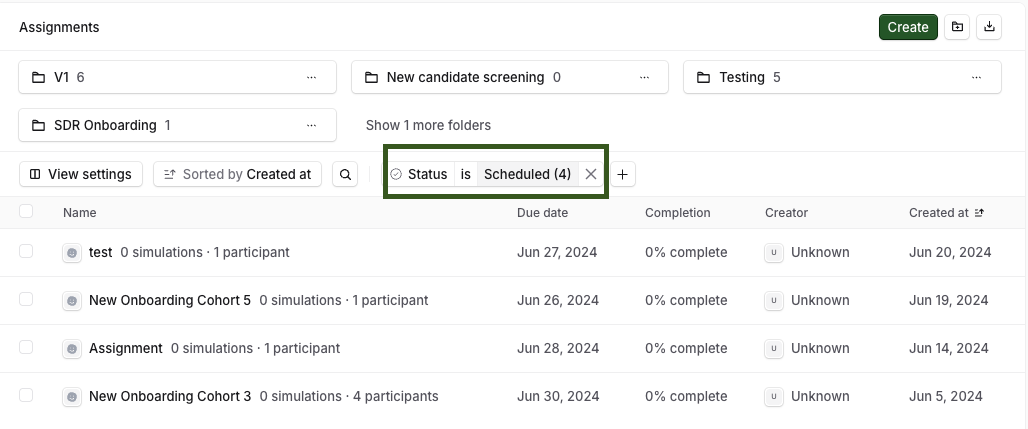
The learners will not see the assignment until the set start date
This is easy to miss because the assignment can otherwise look fully configured, learners, groups, and content all in place, with status being the only thing holding it back.
Check whether the assignment has expired
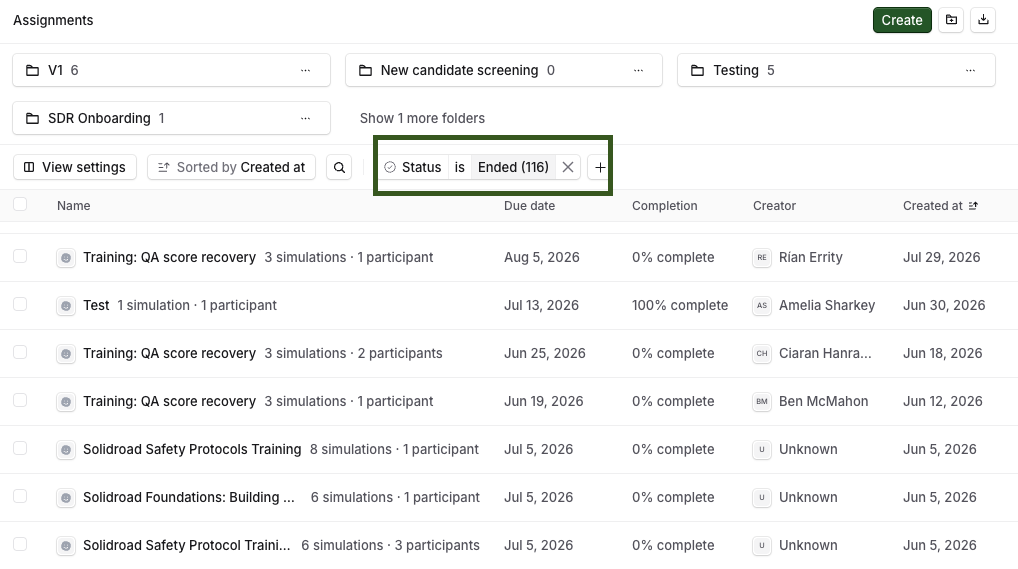
This is the single most common cause. An expired assignment disappears from the learner's active list and cannot be reopened from My Assignments.
Confirm the assignment's status shows Ended, or that the Due date has passed.
The learner can still take the underlying simulation directly from the Simulations library, but this will not count as completing the assignment, it's a workaround for practice only, not a fix.
If expiration dates keep causing this for low-stakes content like onboarding training, consider removing the expiration date on that assignment going forward.
If the learner says they already completed it
A scored attempt only counts toward an assignment if it was launched from inside the assignment.
Ask whether they clicked Start assignment inside My Assignments, or launched the simulation from the Simulations tab, a direct link, or an email that pointed at the simulation itself.
Both produce a scored, visible result in Reports, but only the one started from inside the assignment attaches to it. Nothing in the product currently flags this difference to the learner at the time.
Rollout emails and shared links should point learners to the assignment, not to the simulation directly.
If a workspace setting recently changed
Hiding the simulation library from learners can also hide their Performance tab entirely, which removes their way of seeing assignment results even when the assignment and score both exist correctly. If a setting was changed recently and this started shortly after, that's worth checking before anything else on this list.
If none of these fit
If the learner insists an assignment or a completed attempt was there and then genuinely vanished, rather than never having shown up, this may be a save or sync failure rather than a visibility issue. Contact Solidroad support with the learner's name, the assignment, and roughly when they noticed it missing, and we'd be happy to investigate further.
Related articles
If you have any further questions, contact the Solidroad team via the Help tab in the platform.