Custom roles with SSO and SCIM
Last updated: October 16, 2026
If your workspace provisions people through an identity provider, your custom roles can be assigned from there in the same way the default roles are. This covers mapping your IdP's values to a role, what happens when a value is not recognised, and the two things that work differently once a role is mapped: renaming it and deleting it.
Setting up the connection itself is covered in How to set up SSO & SCIM.
Pointing your IdP values at a role
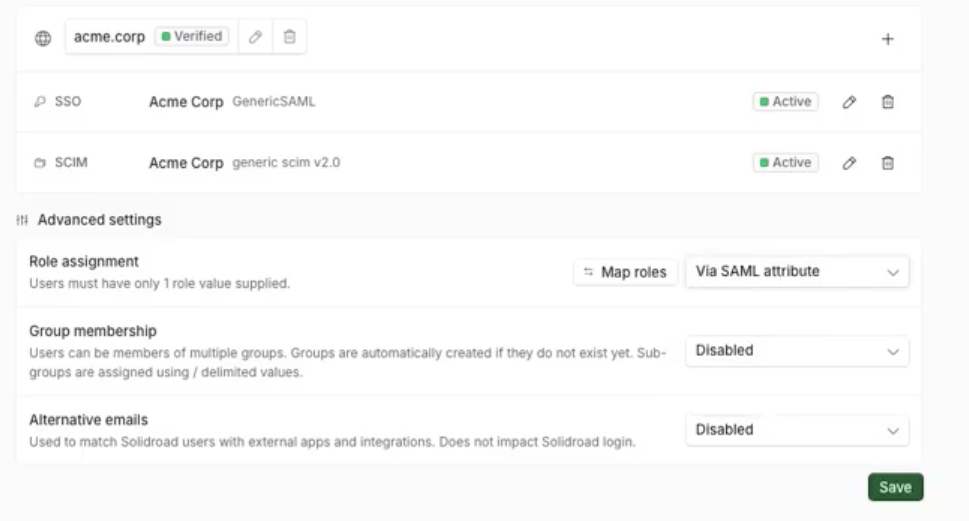
Mappings are set up in the Map Roles modal in your SSO settings. It covers all three sources: a SAML attribute, a SCIM attribute and a SCIM group. Each role is listed with its slug beside its name, which is how you tell two similarly named roles apart.
Several incoming values can point at the same role. That helps when different parts of your directory spell the same job differently, so Team Lead, team-lead and TL can all arrive at one role. Within a single source, each value points at one role. Matching ignores capital letters.
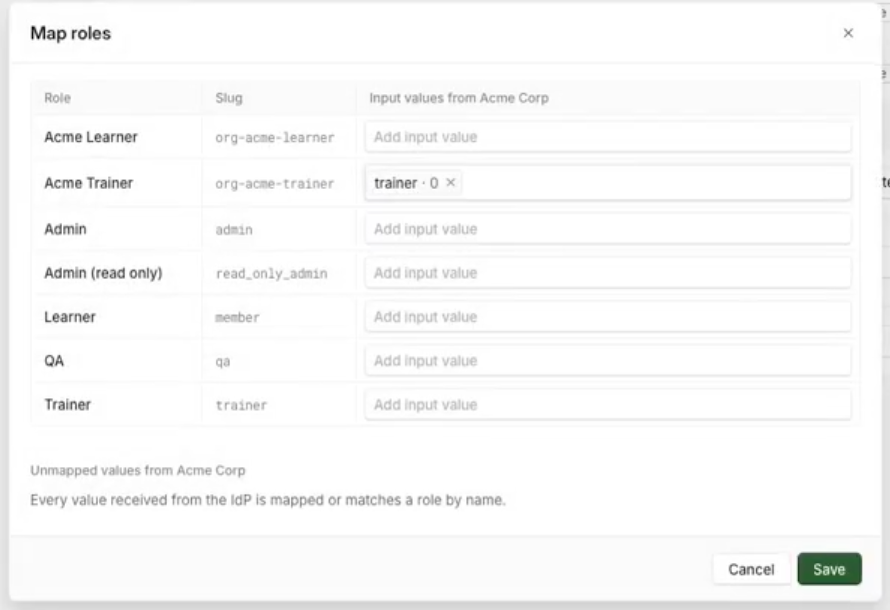
Where values have already arrived from your IdP, the field suggests them, so you can pick from what your directory is actually sending rather than typing from memory. You can also enter a value by hand if it has not come through yet.
When a value is not recognised
Nothing is downgraded. An unrecognised value means we have not been told where it should go, not that the person should lose access, so anyone already holding a role keeps it. Add a mapping for that value whenever you are ready.
The same applies to a value we have not seen yet. Not having observed something is not the same as knowing it is not coming, so an empty suggestion list is not a sign that your directory is misconfigured.
Changing the role of someone your IdP manages
You cannot change it in Solidroad. If a person's role comes from your identity provider, it is set there and locked here, so the change has to be made in your directory and arrives on their next sign-in or sync.
People who do not carry a role value from your IdP are not locked, and can be assigned a role in Solidroad as normal.
Renaming a role while role provisioning is on
Renaming a custom role is blocked while your workspace uses SAML, SCIM attribute or SCIM group role assignment. Your identity provider can assert a role by its display name, for current members and for anyone who joins later, so a rename would break that match silently.
To rename one:
Turn off the role assignment setting in Solidroad.
Update the role claim or group mapping in your identity provider to the new name.
Turn the setting back on, and rename the role.
The slug does not change either way, so anything matching on the slug is unaffected.
Deleting a role your IdP maps to
Solidroad asks you to redirect the mappings before the role goes. The review step lists every IdP value pointing at that role, and each one gets its own destination. A value you leave alone goes to Learner, so it is worth working through them rather than accepting what is there.
When you confirm, Solidroad rewrites those mappings to the destinations you chose, moves the members holding the role, and then deletes it. Because nothing points at the deleted role afterwards, a later sign-in or directory sync cannot bring it back.
This works for roles coming from SAML attributes or SCIM attributes. If your mappings come from SCIM groups or from a SCIM directory, the deletion is refused until we clear them, so contact us and we will do it with you.
You also cannot delete a role while an earlier remap for it is still running. Wait for that to finish and try again.
The rest of the deletion flow, including reassigning the people who hold the role, is covered in How to edit or delete a custom role.
Related articles
If you have any further questions, contact the Solidroad team via the Help tab in the platform.